Construction software
How do you use Woub alongside Moneybird, SnelStart and other invoicing software?
The job is finished. While preparing the invoice, it becomes clear that the client requested additional work along the way. The carpenter carried it out, but nobody in the office knows exactly what was agreed. Your invoicing software can send an invoice. First, the information from site needs to arrive in time.

By: Floris Meulensteen

Direct answer
Use your quotation and invoicing software for prices, quotations, invoices and financial processing. Use Woub alongside it for daily project communication and following up changes. Specific Woub connections are documented for Exact Online, Moneybird, SnelStart and WeFact. With other packages, you can start with a consistent project reference and handover. Choose according to your work process: fixed price, time and materials or job sheets. Checking confirmed agreements remains necessary.
When do you use Moneybird, SnelStart or invoicing software?
Which quotation and invoicing tools can you use alongside Woub?
For contractors and subcontractors working on existing buildings, the first question is which administration suits their work. Do you use fixed contract sums, invoice time and materials or mainly work from job sheets? That distinction says more about your software choice than headcount alone.
This overview includes nine software packages, plus Word and Excel. Compare their role in your workflow; this is not a ranking. Functions and modules differ by subscription.
Tool | What do you do in it? | What should you consider in your workflow? |
|---|---|---|
Exact Online | Quotations, sales invoices and financial administration, depending on your setup. | Establish which Exact Online solution you use; Exact Bouw is a separate product. Product guide. |
SnelStart | Bookkeeping and invoicing, with additional functions depending on the package. | Check whether your package supports the order and integration functions required. Packages. |
Moneybird | Have quotations signed online and turn them into invoices, alongside bookkeeping. | Keep the agreed quotation and later additions clearly linked to the same project. Quotation functions. |
WeFact | Create quotations, have them accepted online and turn them into a draft invoice. | Decide where you invoice and how that information reaches the accounts. Quotation functions. |
e-Boekhouden.nl | Prepare quotations and invoice them fully or partly after approval. | The quotation function belongs to the invoicing module; bookkeeping alone does not provide the same functions. Quotation function. |
Rompslomp | Create quotations and turn an approved quotation into an invoice. | Check your subscription and track which quotation version is final and approved. Quotation workflow. |
OutSmart | Connect quotations with job sheets and invoicing of recorded time and materials. | First investigate what the existing job sheet workflow already covers before adding duplicate records. Quotations and invoicing. |
Yuki | Process an accepted quotation into a sales invoice. | The Dutch guide describes a manual status change followed by generating the invoice. From quotation to invoice. |
Yoobi | Quotations through CRM functionality and invoicing based on time and projects, among other sources. | Match the chosen modules to your quotation and time-recording process. Invoicing and quotation modules. |
Microsoft Word | Prepare a quotation or invoice as a document using your own template. | Arrange how you track numbering, versions, approval and processing yourself. Microsoft templates. |
Microsoft Excel | Calculate amounts and maintain your own quotation or invoice overview. | Check formulas and document which file and version are authoritative. Microsoft templates. |
Use these considerations to test your own workflow. A standard Word or Excel file does not automatically organise handover of a site change to the administration team; working agreements or separately configured automation remain necessary.
Woub has the same role alongside all these tools: organising daily project communication and follow-up. How data reaches the financial application differs by package. A place in the software landscape does not mean a Woub integration exists for every logo.
How do you divide responsibility?
Have the owner or administration team oversee quotations, prices and invoices in the financial environment. Have the site manager or project manager gather project questions, photos and working agreements within the project in Woub. Then appoint one employee to hand confirmed changes over to the administration team and check that they have been processed.
In a small business, one person may hold several roles. Distinguishing the steps still helps: carrying out work and invoicing it are two different actions.
Which route suits your construction business?
You mainly work with a fixed contract sum: check whether you can properly track quotation versions, additions, advance payments and the final invoice.
You charge for time and materials: check where you record them, who checks them and how they reach the invoice.
You work from job sheets or service orders: first test the existing route from instruction to job sheet and invoice; do not add duplicate records.
You use Word or Excel: agree who oversees the final document and tracks what has been confirmed, invoiced and paid. Investigate invoicing software if maintaining that overview requires too much manual work.
These are decision rules for your own process, rather than a fixed recommendation of one brand. If conversations and changes mainly remain out of view, communication and handover are what need improving.
What role does Woub play in quotations and changes?
Woub brings daily communication around a job together. In the project chat, you discuss questions with colleagues and parties involved, share photos and turn a message into a task with an owner and deadline. A site manager can therefore record a change and ask the construction project coordinator to work through its consequences. The functionality is described on the project chat page.
Calling about a change. Call from the relevant project in Woub. Wouby AI can summarise supported conversations and automatically turn identified agreements into tasks. An instruction to prepare an additional quotation can therefore enter the follow-up workflow. See calling from within the project.
Discussing changes in a meeting. Are several changes being discussed during a construction meeting or work discussion? Woub lets you record that meeting and generate a transcript, summary and action items. Check which changes still need developing and who will handle them. Read more about recording meetings.
With both approaches, check that the record is accurate. An AI summary can contain errors; a task to prepare a quotation for additional works is not yet a confirmed instruction or financial processing.
What does practice show?

Beentjes Hekwerk & Toegangstechniek already used Exact Online for invoices and ENK as its ERP package. Yet agreements from phone calls, emails and WhatsApp became scattered. The owner describes, for example, a colour change that was not communicated centrally, leading to a gate being delivered in the wrong colour. The business began using Woub with an internal project chat and a separate chat with the client.
That example shows why good financial software and good project communication may be needed alongside each other. The case does not prove automatic invoice processing. Read the Beentjes customer story.
What can integrations take over?
Exact Online. The Woub documentation describes how an accepted quotation with a previously unknown reference number creates a new Woub project, with quotation lines as a job sheet checklist. A subsequent quotation with the same reference number is added to the existing project. You can also prepare a draft invoice in Exact Online from Woub. This requires the project number and contact details to be completed. This concerns Exact Online; do not use this functionality to describe Exact Bouw. See the Exact Online integration.
Moneybird. The Woub guide describes how an accepted quotation can create a project in Woub, with quotation lines in a job sheet checklist. For an existing project, the match between the quotation reference and Woub project number is important. The guide also describes creating a draft invoice in Moneybird from Woub. These are configured data flows; the financial document stays in Moneybird. See the Moneybird integration.
SnelStart. According to the Woub guide, sales orders with the status ‘Uitgevoerd’ can be added as projects in Woub, including project and contact details and quotation lines as a job sheet checklist. The guide also describes invoice data in the financial overview and creating an invoice in SnelStart from Woub. Package conditions apply to access. See the SnelStart integration.
WeFact. The Woub guide describes transferring an accepted quotation as a project and job sheet checklist. For an existing project, the quotation reference must match the Woub project number. You can also create a draft invoice in WeFact from Woub. WeFact itself also describes this integration for project communication and invoicing time and materials. See the Woub guide for WeFact and integration page at WeFact.
Some of these guides date from 2024; the sources were consulted on 22 October 2026. Before activation, have current package conditions, costs and settings confirmed. Test one instruction from quotation to invoice, including an additional quotation for an existing project. Check the project number, transferred lines and financial outcome. Each integration has its own conditions; do not assume identical functionality for all four packages.
How do you work alongside e-Boekhouden.nl, Rompslomp, Yuki, Yoobi or OutSmart?
For these packages, we describe a workflow alongside Woub here without promising a direct Woub integration. Keep the quotation, job sheet or invoice in the application you already use for it. In Woub, discuss the project question and follow up the agreed action. The person responsible processes the confirmed outcome in the financial or job sheet system, using the same project and change reference.
With e-Boekhouden.nl, Rompslomp and Yuki focus on the transition from a change request to the correct additional quotation and invoice. Tell the administration team which pricing agreement is confirmed and refer within the project to the associated document. The software continues to handle financial processing.
With Yoobi first establish where time and projects are authoritatively recorded. If you already use those records for invoicing, do not create a second time record in Woub. Hand the agreement or change over to whoever updates the Yoobi order or project.
With OutSmart an existing route from quotation to job sheet and invoice may already cover a great deal. Keep that route intact. Woub adds something only if a specific communication problem remains, such as coordination with the client or subcontractors outside the job sheet workflow. If your existing workflow already handles that coordination well, extra software for the same purpose is not automatically necessary.
Still want to automate? Ask for a demonstrable data flow, conditions and a working demonstration for your exact package. That package’s integration with an accounting system does not prove a direct integration with Woub. An open API makes custom development worth investigating, but does not prove such an integration already exists.
How do you ensure additional works are financially processed in time?
Make every change identifiable and appoint someone to complete handover to the administration team. With or without an integration, it must be clear which additional work was requested, what is confirmed and what still needs processing.
An illustrative example: during a refurbishment, the client requests an extra internal door. The carpenter discusses the desired position, the construction project coordinator works through the consequences and the owner prepares the additional quotation. For example, use change reference M-03 in every subsequent step.
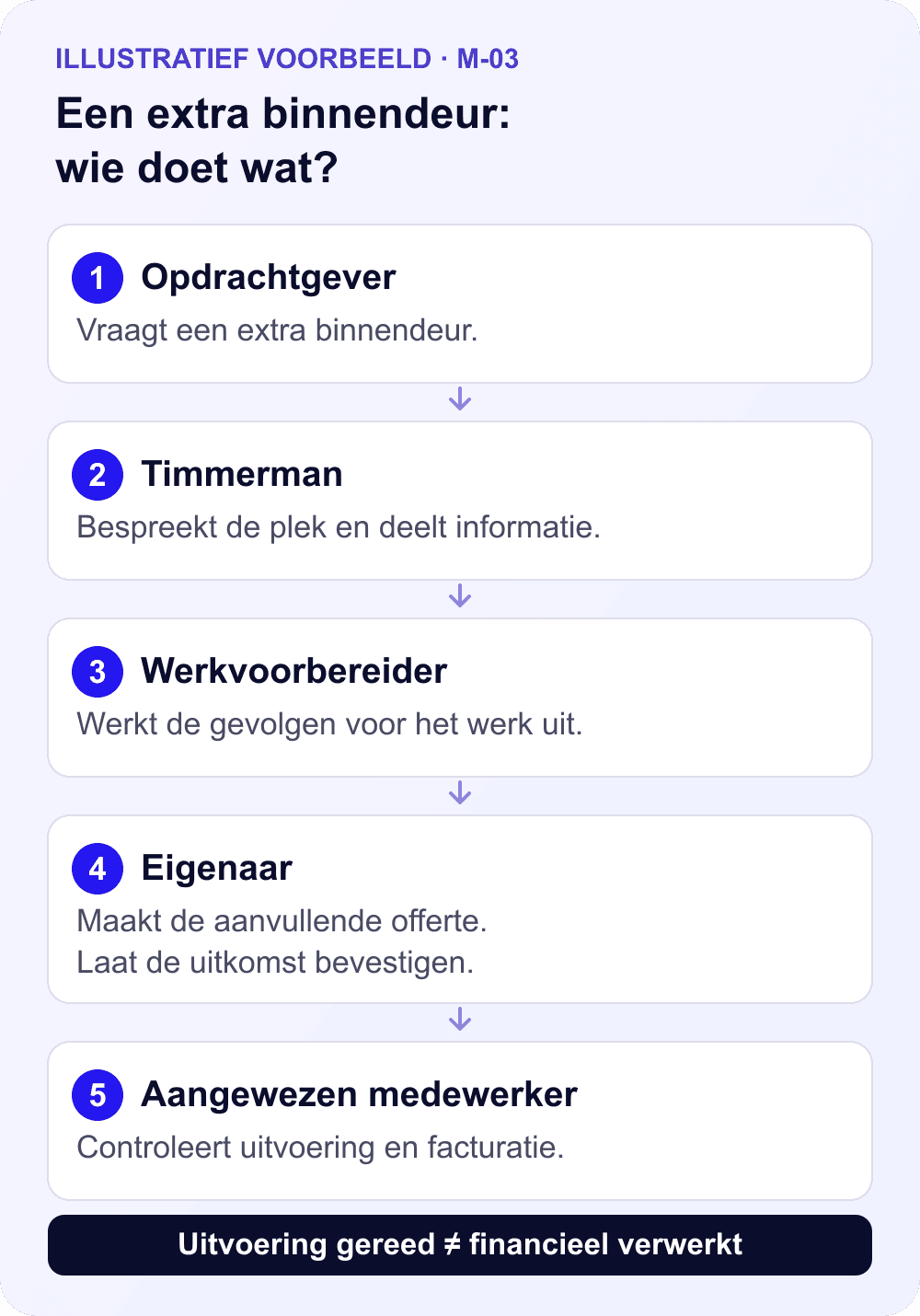
Record the request. Within the project, record what the client requests, where the door should go and which information is still missing. Add a photo if necessary. Label it as a request while details are still being developed.
Make follow-up specific. Assign assessment to the construction project coordinator: check the work, materials and consequences for the project. Agree when the additional quotation must be ready.
Record the confirmed outcome. Arrange pricing and confirmation through the agreed quotation procedure. Refer to the correct quotation and change reference in project communication so the team knows which work has been agreed.
Check handover to the administration team. The designated employee compares the confirmed work with the work carried out and financial processing. With an integration, they check which data was actually transferred.
Also agree when a task is complete. ‘Door installed’ means the site work is complete. ‘M-03 financially processed’ means the administrative follow-up is complete. Keep that distinction visible so ticking off a construction task does not quietly end the invoicing check.
Read more about the whole change process in documenting and communicating additional and omitted works.
The same logic applies to subcontractors: a change they report may affect both your costs and your agreements with the client. Have one person responsible assess both sides before considering the item resolved.
How do you prevent Woub creating extra duplicate work?
For daily project communication, let Woub replace separate WhatsApp groups and any separate task app. Bringing project questions and follow-up together there also reduces daily project email. Your financial software keeps its own role. This establishes specifically which communication moves to Woub.
Start with one project and one fixed agreement: discuss daily project questions and changes in Woub. Have the site team post the photo or question there and the person responsible in the office handle the financial details. The team does not need to maintain a second set of financial records for that.
Without an integration, you can start with a shared project reference and a regular handover. An integration becomes particularly useful if you frequently transfer the same client details, project information or quotation lines. First choose which data is authoritative where; then automate the handover that actually takes time. View the available integrations in the Woub Marketplace.
During the trial, check whether everyone participates, how much you still need to retype and whether the administration team can establish what needs processing without follow-up calls. If messages remain in WhatsApp or nobody oversees follow-up, that workflow needs improving first. Compare the effort and current Woub costs with the problem you are solving.
When does a construction business progress to ERP?
Investigate ERP when several business processes persistently fail to connect adequately. Examples include procurement disconnected from project budgets, material orders recorded in different places or project results that require repeatedly combining data from separate accounts.
First examine what your existing package can already do. Moneybird offers more than invoices alone; SnelStart packages also differ in scope. Missing configuration or an unused function may call for a different solution from a complete switch.
Use these considerations:
Financial administration works, but agreements get lost: improve project communication and handover to the office.
The same data is entered repeatedly: investigate the available integration and check the direction and conditions of data transfer.
Procurement, material flows and project control remain disconnected: compare extending your current setup with a suitable ERP package, including implementation, data migration and administration.
In each situation, Woub remains complementary for ad-hoc project communication. ERP, accounting, estimating and other specialist construction software retain their own functions. The choice depends on your processes and the handovers that stall, rather than a fixed headcount or turnover threshold.
Start small. Enjoy the peace of mind. Expand only then.
Want to know whether this combination suits your business? Choose one ongoing job and follow a change from the initial question through to financial processing. Try Woub free for 14 days and assess whether the site manager, project manager and administration team work better from the same information.
Frequently asked questions
Do I need to leave my quotation or invoicing software to use Woub?
No. Woub supports project communication and follow-up alongside existing software. Let financial documents, job sheets and accounting retain their own roles. First determine which communication problem you want to solve and which data you may want to transfer.
Which quotation and invoicing tools have documented Woub connections?
Specific integration guides are available for Exact Online, Moneybird, SnelStart and WeFact. They describe different data flows and conditions. That does not prove every subscription is suitable or every change is processed automatically.
Can I use Woub alongside e-Boekhouden.nl, Rompslomp, Yuki or Yoobi without a connection?
Yes, by organising daily project communication in Woub and making an employee responsible for handover to the financial application. Use the same project and change reference. This is a workflow using the systems alongside each other; it does not promise automatic synchronisation.
Does Woub still add value if I already use OutSmart?
That depends on the remaining communication problem. If quotations, job sheets, hours and invoices work well in OutSmart, retain that route. Only investigate Woub for coordination that is still inadequately handled. Avoid duplicate records and assess the added value with the people who need to use it.
Can I keep preparing quotations in Word or Excel for now?
You can if you carefully organise numbering, versions, confirmation and financial processing. Woub helps with project communication but does not turn a separate document into a configured invoicing administration system. Investigate specialist software once manual follow-up no longer provides enough oversight.
Does Wouby AI automatically turn a conversation into an invoice?
An automatically created task is neither a confirmed price agreement nor an invoice. Wouby AI helps follow up agreements; pricing, confirmation and financial processing remain separate steps. The connections described support specific invoice actions, rather than a general route from a conversation to an automatically sent invoice.
This site is protected by reCAPTCHA. Google’s Privacy Policy and Terms of Service apply.





