Project communication
How do you capture construction conversations and agreements properly?
A subcontractor calls about a delivery. The site manager discusses a different sequence of work. Later, a colleague in the office is asked what exactly was agreed. Good records mean someone who was not in the conversation also knows what applies and who takes the action forward.

By: Floris Meulensteen

Direct answer
Wouby AI automatically captures agreements from supported construction conversations within the project and turns identified action items into tasks. The subject, summary and tasks become available automatically; you do not need to retype the agreements. Check the output for decisions, conditions, assignee and agreed timeframe. Process implications for planning, costs or drawings in the designated systems. Use the project's review process for formal meeting notes.
Which agreements arise during conversations and meetings?
A construction conversation produces decisions, questions and actions. Check that the automatic output distinguishes them correctly. A recording preserves conversation information, but does not automatically tell a colleague which agreement applies, what remains uncertain and who needs to act.
A construction project coordinator might discuss with a supplier that a delivery may arrive later. The site manager then needs to know whether the date is confirmed and whether subsequent work can still start. Simply writing ‘delivery discussed’ does not help enough.
Distinguish between discussed, decided and to do
Status | Illustrative statement | What do you record? |
|---|---|---|
Discussed | ‘The materials might be able to arrive on Thursday.’ | A possibility; confirmation is still missing |
Decided | ‘The supplier has confirmed Thursday as the delivery day.’ | The confirmed outcome, source and any conditions |
To do | ‘The construction project coordinator will request confirmation by Tuesday.’ | The action, person responsible and deadline for feedback |
The deadline for requesting confirmation is therefore different from the delivery date. Even a confirmed delivery day does not automatically mean a start date in the programme has changed. Check who assesses those implications.
How to find the agreement details in Woub
The information below is already in Woub when you use the supported calling or meeting function. You do not fill in a separate agreement card for this. Wouby AI generates the subject, summarises the conversation and creates tasks. This is how a colleague finds the outcome:
Element | What should a colleague be able to find? | How to find it in Woub |
|---|---|---|
Project and location | The right job, plot number or work area | You call from within a project. The conversation is therefore immediately stored within the right project; the location discussed can be found in the conversation information. |
Subject | The delivery, change or question the conversation concerned | Wouby AI automatically generates a subject for the conversation. |
Source and time | Which conversation or meeting the agreement came from and when it took place | Each supported call or meeting gets a conversation summary with date and time, similar to recent calls on your phone. |
Status | Proposal, confirmed decision or open question | The status of agreements discussed appears directly in the conversation summary. |
Action and person responsible | What needs to happen and who will pick it up | Wouby AI automatically creates tasks and assigns the right person. If it is not known when a task needs to be picked up, it is dated today. |
Feedback | When the outcome is needed and who should receive it | The feedback discussed is included in the conversation summary. |
Conditions and implications | What still needs confirmation and whether processing elsewhere is needed | What still needs confirmation appears under a separate heading in the summary. You can read the implications discussed there; processing in the programme or other systems remains a separate step. |
Conversation summary and tasks shown
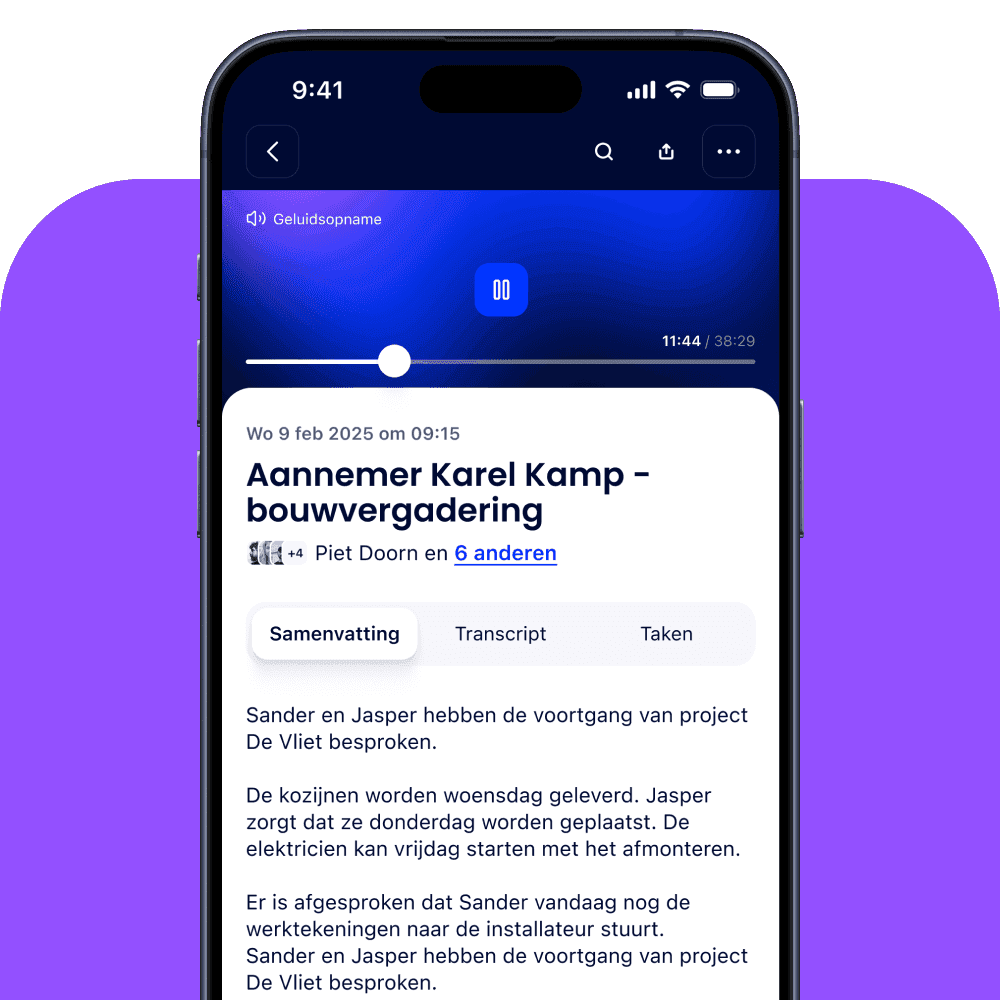
Caption: The conversation record brings together the subject, date, participants and summary. The tabs take you to the transcript and tasks. Product image from the Woub calling page. View at full size.

Caption: In the task list, you can find tasks with their project and date. The image shows the task view; automatic assignment and the default date are explained above. Product image from the Woub calling page. View at full size.
Product image source: calling through Woub.
Check the automatically recorded agreement and add only missing or unclear information. For a change affecting money, site work or the programme, the agreed assessment process remains necessary. Recording a statement gives nobody additional decision-making authority.
How do you create transcripts and summaries?
Use a supported calling or recording method, record the conversation in the right project context, then check the output. A transcript helps you find what was said. A summary organises the main points. Neither is automatically a checked decision or an approved record.
Start with the right project and calling method
At calling through Woub, you start audio or video from the project chat. Afterwards, Wouby AI supports recording the outcome with a transcript, summary and actions. For an in-person site meeting or work meeting, there is also recording meetings.
Do not assume an ordinary phone call outside Woub is processed in the same way. Before the trial, check which calling and recording method you use. If you receive a regular call, record the relevant agreement according to your agreed approach. Do not promise automatic recording that has not been confirmed for that type of conversation.
Focus on checking information someone will act on
When reading back, check names and project locations, dimensions and quantities, materials, dates and conditions. Also check negatives and uncertainty. ‘The painter cannot start on Thursday’ must not become an action to have them start on Thursday. ‘We are investigating whether this is possible’ is not yet approval.
If you doubt a passage, use the available source or ask those involved for confirmation. For an open point, state what still needs investigating. Do not fill in a missing amount, person responsible or deadline as though it had been discussed.
What if one phone call covers three projects?
A subcontractor sometimes works on several jobs. The conversation starts with project A and ends with a delivery for B and a question about C. In Woub, this remains one conversation record. Wouby AI recognises the projects mentioned and automatically links specific tasks to the right projects. You can therefore find tasks from the same conversation within the project they concern, including in the overall task overview by project.
Check that the recognised task and linked project are correct. There remains one conversation record for the background. Woub is working on a function that lets you easily share parts of such a record in other projects. That sharing function is still in development; automatic project linking of tasks is already available.
Arrange the recording policy before starting
Woub has had the legal framework for using the service drawn up by a specialist IT lawyer. The terms and conditions and privacy statement explain which agreements apply and how personal data is processed. Review these documents with users at the start and have them accept the applicable terms and read the privacy statement. You therefore do not need to draw up Woub's legal framework from scratch yourself.
Your own use also remains relevant when recording conversations: inform participants about recording, use an appropriate lawful basis and agree who has access and how long the information is needed. Accepting terms and conditions or reading a privacy statement does not replace those responsibilities. The European data protection authorities explain the responsibilities of organisations and service providers.
Also check whether project information may be processed in an external application if you later use a transcript elsewhere.
How do you turn agreements into tasks and deadlines?
If you use Woub for communication on your construction project, Wouby AI automatically records agreements from supported conversations by project. After a conversation through Woub or a recorded live meeting, the summary and automatically created tasks appear with the project information. Wouby AI assigns the right person responsible to the task. If no deadline has been agreed, the task is dated today. You therefore do not need to retype the agreements afterwards.
Roland Balk, construction project coordinator and planner at Karel Kamp, describes the value of project-based communication: ‘Only now, you have all those conversations in one place and link them to projects.’ — Karel Kamp customer story.
His quotation illustrates the value of finding conversations within the project. Automatic task creation is the Wouby AI functionality described above. Check the outcome for content, person responsible and deadline; a created task is not yet completed work.
Check the task in four steps
Content: is this the right follow-up action, without turning a proposal into a decision?
Person responsible: does the right person know they need to pick up the action?
Deadline: is this the agreed date for carrying out the work or a time for feedback?
Recipient: who needs to know the outcome to continue working?
Take the delivery example. ‘Arrange delivery’ remains vague. ‘Construction project coordinator asks the supplier to confirm the delivery day by Tuesday and reports back to the site manager’ makes the next step clear. If no outcome arrives on Tuesday, the site manager knows they cannot rely on a confirmed Thursday delivery.
Wouby AI automatically assigns the right person to the task. If it is not known when it needs to be picked up, it is dated today. Check whether the date is a discussed deadline or the task's default date. Today as the task date does not mean a supplier has promised delivery today. Where a deadline is missing, discuss when work or feedback is needed.
Connect the task with follow-up, without duplicate administration
After confirmation, the site manager can assess which work can continue. The planner processes any necessary programme change. The authorised employee adjusts an order where needed. Those actions belong in the systems used for those purposes.
Woub supports complementary ad-hoc project communication and does not replace any part of ERP, BIM, estimating, DMS or specialist scheduling. Do not assume automatic processing in those systems. Agree who transfers the outcome and check separately whether a desired integration actually exists.
For the functionality and checking of AI actions, read more about turning agreements from construction conversations into tasks.
How does a project manager keep an overview?
A project manager mainly needs visibility of confirmed agreements, open actions and questions blocking site work. Not every conversation needs to be reread in full. The relevant outcome needs to be retrievable, with the right status and person responsible.
Check exceptions and changes
Regularly review with the team which agreement has changed, which action lacks an owner, which deadline is uncertain and who is waiting for another party. Make direct contact in urgent cases. Afterwards, record the outcome within the right project again.
If a previously confirmed delivery day changes, make clear which agreement now applies. State what has changed, who confirmed it and who needs to assess the implications. Do not simply overwrite an isolated date without explanation. This prevents one colleague building on the old agreement while another builds on the new one.
What the Karel Kamp case shows about this
In the Karel Kamp customer story, Roland Balk describes a familiar handover problem: employees speak with different colleagues, so not everyone knows what has been agreed by phone. The case describes how shared project communication helps him find which problems arose, which solutions followed and who is involved.
This supports the practical value of shared project context. It is a described customer experience, rather than proof that every summary is complete or every organisation achieves the same result. Important agreements still need checking.
Adapt checks to the organisation
With 1–10 employees, the owner often performs several roles. Agree who takes over agreements and return calls during absence. Test whether that colleague can see which delivery is confirmed without an extra call.
With 10–100 employees, there are more handovers between project management, project preparation and site teams. For each project, assign someone to check unclear agreements and someone to report changes back to the others involved. Include subcontractors in those arrangements.
With 100+ employees, the same approach needs to remain recognisable between teams. Also document handovers, access and responsibility for checks. These are organisational choices, rather than automatic product capabilities resulting from headcount.
The aim remains the same: a colleague who was not in the conversation understands the current agreement and knows which follow-up remains outstanding.
When are formal minutes needed?
Use formal minutes when the project, client or your procedure requires them. A short conversation summary can support daily actions, but does not automatically meet the agreed format or review process for an official record.
Make the route to a final record clear
Check the template, person responsible for the record, recipients and how comments are processed beforehand. Make decisions, open points and actions recognisable. Do not let a draft record and final version get mixed up.
On its meetings page, Woub describes how you can use the transcript with your own minutes template, for example in ChatGPT. This is a separate step with an external application. Check whether project information may be processed there. It is not a demonstrated native integration and does not automatically make the output approved minutes.
Pay particular attention to decisions, amounts, people responsible and deadlines. Have those involved respond through the agreed route, and keep the final record in the designated place. Read the explanation in AI minutes for a site meeting.
Test one conversation from start to follow-up
Choose a recurring supplier arrangement or site meeting. Agree where the outcome belongs and who checks it. Then have someone who was not present find what was decided, what remains open and who takes the action forward. Can that colleague use it without repeating the conversation?
If your existing approach already passes that trial well, you do not need to open another channel. If the connection between conversation and follow-up is missing, test Woub with one project. Try free for 14 days and view the pricing and conditions.
Frequently asked questions
How do I capture an ordinary phone conversation about a construction project?
Within supported communication, Wouby AI automatically creates the record and identified tasks within the project. Check the subject, status, source, action, assignee and agreed feedback; you do not need to retype the agreements. Do not assume the same automatic processing applies to an ordinary conversation outside Woub.
Which app automatically turns construction conversations into tasks?
Woub can do this with Wouby AI within supported communication. Identified agreements automatically become tasks. Check the content, assignee and timeframe; a created task is not yet a confirmed decision or completed work.
Is a transcript the same as formal meeting minutes?
No. A transcript sets out what was said. Formal minutes organise relevant decisions and actions according to the agreed format and review process. Check the output and make clear which version is final.
What do you do if no deadline was agreed?
Woub supports ad hoc project communication: quick coordination about the current situation on the project. Many conversations therefore concern what is happening now. If no deadline is agreed, Woub automatically dates the task for today.
Where do you capture a conversation about several construction projects?
There is still one conversation report. Wouby AI identifies the projects mentioned and automatically links specific tasks to the right project, so you can find those tasks by project. Easily sharing parts of a conversation report in other projects is a feature Woub is still developing.
Does an AI summary prove that a change was approved?
For calling through Woub and recorded in-person meetings, the audio recording is the source of the automatically created summary and tasks. You can listen back to check what was actually said and agreed. That keeps the original conversation source available alongside the AI output. An audio recording can serve as evidence, as also shown by case law on audio recordings as evidence (https://uitspraken.rechtspraak.nl/details?id=ECLI%3ANL%3AGHDHA%3A2022%3A2679). That does not automatically mean every discussed change has been legally approved: check what was actually confirmed, by whom and under which arrangements.
This site is protected by reCAPTCHA. Google’s Privacy Policy and Terms of Service apply.





